I spent a day reverse engineering Google Tag Gateway. Here's what I found.
A technical look at Google Tag Gateway, Cloudflare GTG, Consent Mode, GTM, and the one setup that produced a late consent signal in testing.
Google Tag Gateway (GTG) is one of those features that sounds straightforward until you start looking at the implementation details.
According to Google’s documentation, GTG allows Google Tags to be served through your own first-party infrastructure instead of directly from Google domains. Depending on the setup, this can be implemented using a CDN, load balancer, or custom infrastructure.
At first glance that seems simple enough.
However, after reading the documentation I was left with several unanswered questions:
- Does GTG only proxy JavaScript files?
- Does GTG proxy measurement requests?
- How does GTG interact with Google Tag Manager?
- Can GTG affect Consent Mode?
- What happens when a CMP is loaded through GTM?
Rather than guessing, I decided to build a test environment and inspect the actual network traffic.
Test environment
For testing I used:
- Cloudflare Google Tag Gateway
- Google Analytics 4
- Google Tag Manager
- Google Consent Mode
- A CMP
- Chrome DevTools
- Google Tag Assistant
The goal was simple:
Observe what happens in the browser and compare it with what the documentation suggests should happen.
Understanding the Cloudflare implementation
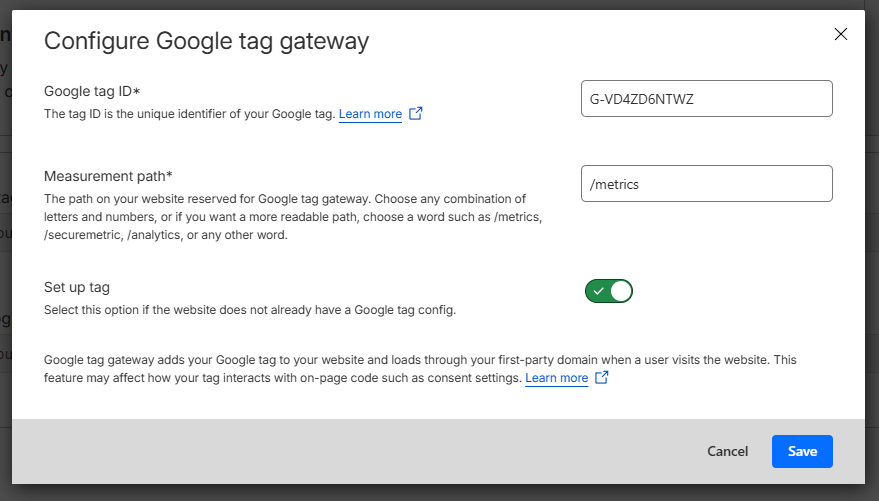
Cloudflare’s GTG implementation allows you to configure a Google Tag ID and exposes a first-party endpoint that serves Google resources through your own domain.
It also includes a “Set up tag” option which automatically configures the Google Tag on the page.
This option ended up being far more important than I expected.
Test 1: Google Tag through GTG
The first test used a standard Google Tag (G-XXXXXXXXXX) configured in Cloudflare GTG.
The expectation was simple:
Browser
  |
  +--> First-party GTG endpoint
  |
  +--> First-party measurement endpoint
During testing I observed something different.
The Google Tag JavaScript was clearly being served through the GTG endpoint.
However, GA4 measurement requests continued to be sent directly to:
region1.google-analytics.com
Observation
GTG successfully proxied JavaScript delivery.
I was unable to observe browser-side GA4 measurement traffic being routed through the GTG endpoint.
This does not necessarily mean measurement forwarding is not occurring somewhere in the infrastructure. It simply means I could not observe browser-side GA4 collection requests using the first-party GTG path.
Test 2: GTM through GTG
Google’s documentation focuses on Google Tags rather than GTM containers.
To understand how GTG behaved with GTM, I modified the standard GTM snippet to load GTM from the GTG endpoint instead of Google’s servers.
Original GTM snippet:
<script>
(function(w,d,s,l,i){w[l]=w[l]||[];w[l].push({'gtm.start':
new Date().getTime(),event:'gtm.js'});var f=d.getElementsByTagName(s)[0],
j=d.createElement(s),dl=l!='dataLayer'?'&l='+l:'';j.async=true;j.src=
'https://www.googletagmanager.com/gtm.js?id='+i+dl;
f.parentNode.insertBefore(j,f);
})(window,document,'script','dataLayer','GTM-59QC6XDD');
</script>
Modified version:
<script>
(function(w,d,s,l,i){w[l]=w[l]||[];w[l].push({'gtm.start':
new Date().getTime(),event:'gtm.js'});var f=d.getElementsByTagName(s)[0],
j=d.createElement(s),dl=l!='dataLayer'?'&l='+l:'';j.async=true;
j.src='/metrics/gtm.js?id='+i+dl;
f.parentNode.insertBefore(j,f);
})(window,document,'script','dataLayer','GTM-59QC6XDD');
</script>
Important: this configuration is not documented by Google and was used only to explore GTG behavior during testing.
Result
GTM loaded successfully through the first-party endpoint.
However, when I configured the GTM Container ID as the GTG target, Google Tags inside the container became disconnected and measurement stopped functioning correctly.
Google Tag Assistant reported deferred hits and disconnected tags.
Observation
Using a GTM Container ID as the GTG target produced unexpected results and broke measurement during testing.
Test 3: What is GTG actually sending?
This was the first genuinely surprising finding.
While GA4 measurement requests continued to use Google’s analytics endpoints, I observed requests being sent through the GTG endpoint containing data such as:
gtm.init_consent
gtm.init
gtm.js
gtm.dom
gtm.load
Example request fragments looked similar to:
t=l
gtm.init_consent
gtm.init
gtm.load
These did not appear to be standard GA4 measurement requests.
Instead, they looked more like lifecycle, telemetry, initialization and configuration events.
Observation
GTG appears to receive some Google Tag and GTM lifecycle information through the first-party endpoint even when standard GA4 measurement requests continue to be sent directly to Google Analytics endpoints.
This aligns with Google’s wording that “some measurement requests” may use the first-party domain.
Test 4: The importance of “Set up tag”
The next discovery came from Cloudflare’s “Set up tag” option.
Set up tag disabled
When GTG was configured with the correct Google Tag ID and “Set up tag” was disabled:
- The Google Tag JavaScript was served through GTG.
- The Google Tag could be configured normally through GTM.
- Measurement worked correctly.
- Consent Mode behaved as expected.
Set up tag enabled
When “Set up tag” was enabled:
- GTG automatically configured the Google Tag.
- Measurement activity started earlier.
- Initialization order changed.
This led directly to the final test.
Test 5: Can GTG create a consent problem?
I wanted to determine whether GTG could cause measurement activity to begin before a CMP had established Consent Mode defaults.
Scenario A
CMP loaded directly on the page.
Google Tag configured through GTG.
Result:
CMP
↓
Consent defaults
↓
Measurement
No issue observed.
Scenario B
CMP loaded through GTM.
Google Tag loaded through GTM.
GTG configured but automatic tag setup disabled.
Result:
CMP
↓
Consent defaults
↓
Measurement
No issue observed.
Even when throttling the network, measurement requests waited until consent defaults had been established.
Scenario C
CMP loaded through GTM.
Google Tag configured through GTG.
Automatic tag setup enabled.
Result:
Google Tag
↓
Measurement
↓
CMP
↓
Consent defaults
In this configuration measurement activity was observed before the CMP had established consent defaults.
This was the only configuration during testing where I was able to consistently reproduce this behavior.
Observation
The combination of:
- CMP loaded through GTM
- GTG automatic tag setup enabled
can alter initialization order and allow measurement activity to begin before consent defaults become available.
What surprised me most
Before starting these tests I assumed the most interesting finding would be measurement routing.
Instead, the most important discovery was initialization order.
The practical impact of GTG was not where requests were sent.
The practical impact was determining which component gained control first:
- GTG
- Google Tag
- GTM
- Consent Mode
- CMP
In most configurations everything behaved as expected.
Only one specific deployment pattern consistently produced unexpected behavior.
Conclusions
After a day of testing, these were my main takeaways.
1. GTG definitely changes initialization order
This is the most important thing website owners should understand.
GTG is not merely a different download location for JavaScript files.
It can change which components initialize first.
2. JavaScript delivery was clearly proxied
Google Tag resources were successfully served through first-party GTG endpoints.
3. I was unable to observe browser-side GA4 measurement requests being proxied
GA4 collection requests continued to be sent directly to Google Analytics endpoints during testing.
4. GTG receives additional telemetry and lifecycle information
Requests related to initialization, consent and tag lifecycle events were observed using the GTG endpoint.
5. Automatic tag setup deserves careful attention
The only configuration that consistently produced unexpected measurement timing was when GTG automatically configured the Google Tag while the CMP was loaded through GTM.
This altered initialization order and allowed measurement activity to begin before consent defaults became available.
Final thoughts
Most discussions around GTG focus on first-party delivery, ad blockers and analytics durability.
After looking at the actual network traffic, I think the more important topic is initialization order.
When multiple systems are involved:
- GTG
- GTM
- Consent Mode
- Analytics
- CMPs
understanding which component initializes first can matter more than understanding where a request is ultimately sent.
And that’s not something you discover from a setup wizard.